Thursday, 23 June 2011

The link between WebSphere Application Server Community Edition and Apache Geronimo

In previous posts I've written on this blog, such as Get OSGi samples running on your machine in 10 minutes and OSGi Bundle Lifecycles I've referred to Apache Geronimo as the light weight application server I've been using.  Geronimo is an open source application server that consumes the Apache Aries project.  However the food chain does not stop there.  An IBM product called WebSphere Application Server Community Edition consumes the Geronimo project.  So what can we infer from this food chain in the future?

Well, Geronimo currently offers full support for the Java EE 6 and enterprise OSGi applications (via integration of Apache Aries).  I asked Kevan Miller, an IBMer who is the PMC Chair of Apache Geronimo and the WebSphere Application Server Community Edition Architect, to clarify the intent for the Community Edition product.  Here's a slide Kevan often uses which carries a clear statement of WAS CE future intents.


I'm looking forward to seeing these functions in WAS CE, particularly the Java EE 6 support and the new OSGi enterprise programming model to WAS CE, in the OSGi platform.

IBM’s statements regarding its plans, directions, and intent are subject to change or withdrawal without notice at IBM’s sole discretion.   Information regarding potential future products is intended to outline our general product direction and it should not be relied on in making a purchasing decision. The information mentioned regarding potential future products is not a commitment, promise, or legal obligation to deliver any material, code or functionality. Information about potential future products may not be incorporated into any contract. The development, release, and timing of any future features or functionality described for our products remains at our sole discretion.

Monday, 13 June 2011

External Bundle Repositories

An external bundle repository is a location that can host a number of OSGi bundles and an xml file, which describes the bundles in the OSGi Bundle Repository. The xml file specifies the capabilities and requirements of a number of bundles together with their URLs. The bundles can live in the same location or different locations from the xml file.

Apache Aries, WebSphere Application Server V7 + OSGi and SCA Feature Packs and WebSphere Application Server V8 all support external bundle repositories. However, a common frustration among those who use external bundle repositories is the creation of the repository. Emily Jiang, a member of our development team, recently developed a repository generation tool that's worth sharing (instructions can be found on the Apache Aries website). The tool takes a list of URLs and generates a repository xml file describing the URLs. If the given URL is a local file directory, the tool will generate metadata for all valid bundles in that directory, which saves the user significant effort, as they do not need to explicitly list every bundle in the target directory. Subdirectories will be recursed for any bundles that exist higher in the directory structure.

For more instruction about how to administer external bundle repositories, check out the docs for the WebSphere V8 beta infocenter: http://publib.boulder.ibm.com/infocenter/wasinfo/beta/index.jsp?topic=%2Fcom.ibm.websphere.osgi.express.doc%2Ftopics%2Fta_admin_obr.html

Wednesday, 18 May 2011

New Enterprise OSGi YouTube video: Blueprint

Blueprint provides a dependency injection framework for OSGi and was standardized by the OSGi Alliance in OSGi Compendium R4.2. It is designed to deal with the dynamic nature of OSGi, where services can become available and unavailable at any time.


A new video on the Enterprise OSGi YouTube channel gives a brief introduction to the Blueprint container. 

Tuesday, 10 May 2011

Contributing to the Enterprise OSGi YouTube channel

I've uploaded a new video to the Enterprise OSGi channel, contributed by @iocanel.  The video demonstrates basic Karaf features.

If you would like to contribute a video based around OSGi please contact me (@sjmaple/on this blog) and we can work to get it on the channel.

Wednesday, 20 April 2011

OSGi Bundle lifecycles

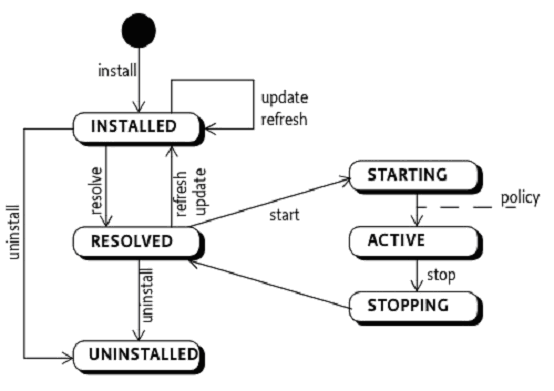
One aspect of the OSGi model which distinguishes it from say Java EE, is the OSGi bundle lifecycle.  During the last few OSGi sessions I have presented, the bundle lifecycle has always been of interest and has often been the source of many questions, so I thought I’d talk about it in a blog post :o).  The easiest way of describing the model is to dive straight into the state diagram that describes the lifecycle.


The diagram, as with any state transition diagram, shows the possible states an OSGi bundle can be in at any time within an OSGi framework, along with the possible transitions it could make to other states.

There is one way into the state diagram (signified by the black blob at the top), and one end state (UNINSTALLED).  These are the ways which a bundle enters and exits an OSGi framework.

I’m going to use the Geronimo OSGi runtime that was created in an earlier blog post to show a bundle going through the various lifecycle states (feel free to run on just the OSGi frameworks if you wish - although the commands will be subtly different).  First, I’ll remove the bundles that were added in the last tutorial by running the following command from the /opt/geronimo/geronimo-tomcat7-javaee6-3.0-M1 directory (alter the file locations to suit your dir structure).

./bin/deploy –u system –p manager undeploy org.apache.aries.samples.blog.jpa.eba

Right, we now have a clean deployment, so lets install a bundle out of the aries blog sample.  Extract the bundles from the .eba file and install the biz bundle into the framework.  Run the following command from within the Geronimo console:

install file:///opt/geronimo/geronimo-tomcat7-javaee6-3.0-M1/org.apache.aries.samples.blog.biz-0.2-incubating.jar

You should have been returned a bundle id.  Type list and the biz bundle will now be the last in a long list of bundles.  Notice it’s in INSTALLED state.  We’ve reached the first state in the lifecycle diagram, above.  If we try to resolve the bundle by running the resolve command, the bundle remains in the INSTALLED state as the current OSGi framework does not contain the required bundles to satisfy the biz bundle’s requirements.  To check which dependencies the bundle is missing, try to start it by running start <bundle id>

Lets now install the API bundle:

install file:///opt/geronimo/geronimo-tomcat7-javaee6-3.0-M1/org.apache.aries.samples.blog.api-0.2-incubating.jar

If we view the list of bundles again we notice both our new bundles are in the INSTALLED state. However if we now try to resolve all bundles in the framework, by calling resolve. We notice that both bundles have now transitioned into the RESOLVED state.  This means that the bundle dependencies from both bundles have been met by the existing bundles in the OSGi framework. 

Install the final two bundles and resolve them:

install file:///opt/geronimo/geronimo-tomcat7-javaee6-3.0-M1/org.apache.aries.samples.blog.persistence.jpa-0.2-incubating.jar

install file:///opt/geronimo/geronimo-tomcat7-javaee6-3.0-M1/org.apache.aries.samples.blog.web-0.2-incubating.jar

resolve

Next we can actually start the bundles, by running start <bundle id> for each bundle in turn. Once all have been started, run the list command to ensure they are all in the ACTIVE state and then go to the blog sample webpage to make sure the blog is running.  You are also able to start a bundle from the installed state if it can resolve its dependencies. The framework will resolve the bundle first and then start it.

Right, so lets have a bit more of a play… lets stop a bundle and see what happens - First let’s stop the persistence bundle.  We’d expect the server to get to the web content as the web bundle still exists, however it will likely fail much beyond that.  Go to the webpage again, and you should see an exception from the web bundle part of our application stating the BloggingService is unavailable. This is because the BloggingService requires another service that was provided by the persistence bundle and therefore no longer exists in the service registry.  We should restart the persistence bundle and check the webpage to ensure we're all working again.

Let’s now stop the API bundle, by calling stop <bundle id> and they try to access the webpage again. Still working?  OK, lets go a stage further and uninstall the API bundle, by calling uninstall <bundle id>.  Check the webpage… Still working? Good isn’t it :)  This works because the consumer bundles that use the API bundle have previously cached the code it requires from it's dependencies, the API bundle.  The API bundle does not register any services, so the other bundles will not miss them, meaning the app can continue to run without the API bundle existing in the environment until a refresh is called on the OSGi framework.  The refresh wires up the new dependency map, refreshing the caches, which now will not include the API bundle.  This test was designed to show that the dynamism of OSGi is in the services rather than the bundles.  Yes, they are linked, without bundles there would be no services.

We can also uninstall bundles that are in the ACTIVE state.  Again, the framework will call stop on the bundle under the covers to get it into the RESOLVED state first and then uninstall the bundle.  The bundle is then back to the black blob at the start of the lifecycle :o)

Tuesday, 5 April 2011

Enforcing OSGi Modularity

Tom Watson is an IBMer based in the U.S. and a co-lead of the equinox project in eclipse.  He has kindly put together a presentation for our EnterpriseOSGi YouTube channel on how OSGi uses modularity.  Do go and take a look here.

Thursday, 31 March 2011

Get OSGi samples running on your machine in 10 minutes

I've seen a few blogs that show how to get Apache Geronimo up and running, followed by how to install the Apache Aries Blog sample to use the neat OSGi functionality. However, that's typically where it stops!  So this post will hopefully be the end to end tutorial for a developer wanting to play with OSGi from scratch in about 10 minutes.

Let's start from scratch... We're going to Install the Apache Aries Blog sample on Apache Geronimo.  Not sure how many people already want to google 'Apache Aries' or 'Apache Geronimo', so I'll explain...

Apache Aries

Apache Aries is a set of Java components that can be added to an existing OSGi framework, such as equinox or felix, to provide an OSGi developer with Enterprise functionality, which a typical EE developer would be used to, such as JNDI, JPA, Transactions etc. To read more on Apache Aries, visit http://aries.apache.org

Apache Geronimo

The Apache Geronimo project produces an application server runtime that uses other open source components to create a rich application environment.  It provides application containers for Java EE applications and OSGi applications (via Apache Felix). One of the open source components it contains is Apache Aries. For more information about Geronimo, check out the project website http://geronimo.apache.org.

So our picture of Geronimo so far is as follows:


Our OSGi bundles essentially run in the Apache Felix framework.  However with the Apache Aries functionality that sits alongside the Felix framework, they are able to connect with some of the typical JEE functionality as well as use other OSGi application features.

You'll need a Java runtime installed on your machine (Make sure the JAVA_HOME and JRE_HOME system variables are set), but I assume you all mostly have this already.  So start your stopwatches... Download Geronimo v3.0 M1, as this has the Apache Aries functionality, from http://geronimo.apache.org/apache-geronimo-v30-m1-release.html you'll want one of the drivers from the "Non-Certified Web Container Releases" section.  You can choose which web container you wish to use, I chose Tomcat. 

Once your download (65MB ish) is complete, gunzip and extract your tar to an appropriate location on linux or just unzip somewhere in windows.  Your Geronimo server is ready to go! Simple as that (hopefully).  To start your server, go to the "geronimo-tomcat7-javaee6-3.0-M1/bin" directory or equivalent and type "./geronimo run". (Ensure you have root privileges)

You should see this screen:


Don't get too excited yet though, as it processes a little more before you should start playing. Wait till you get to this screen:


Right, at this stage our Geronimo Application server is up and running as you can see from the last line of output. Hit enter to get a prompt back.  We can see from this output that we have a few app modules installed including an EAR, a couple of RARs and some WAR files.  Let's now install our own OSGi application.

We need to install a datasource for the application, so firstly, download a rar file that is used to install the datasource here. This will be included in Geronimo in future versions.  Next download the actual data source descriptor here. Once those files have been downloaded, put them in the root directory of your extracted Geronimo server.  From a new command prompt, navigate to the geronimo rooot directory and run the following command, with the server running, to install the datasource:

./bin/deploy -u system -p manager deploy tranql-connector-derby-embed-xa-1.6.rar aries-datasource.xml
We're now ready to install the application.  Download the Apache Aries application binary from https://cwiki.apache.org/ARIES/downloads.html.  I downloaded the Blog JPA app. Click the 'eba' link to download.  With the .eba file in the root Geronimo directory, run the following command, again whilst the server is running:

./bin/deploy -u system -p manager deploy org.apache.aries.samples.blog.jpa.eba-0.2-incubating.eba
To view the blog sample, point your browser to http://localhost:8080/blog.  You should see the following:


Well, you've now got a running Geronimo server and Apache Aries Blog Sample running on your machine in (hopefully) about 10 minutes.  Feel free to have a play around with this sample - It's not massively interesting but is fit for purpose :o)  

Lets now look under the hood in the runtime :o)  From the Geronimo console, type 'list'.  This returns the full list of bundles in the Geronimo framework, including system bundles.  Quite a few, aren't there!  At the end you'll see the blog bundles we just installed:


What we see above is a quite a bit of info on each bundle we have in the environment.  Lets take the first bundle in the highlighted list and look at it in more detail. Important columns to mention are id, state and description columns. The first element is the bundle id.  This is a unique number given to every bundle in the framework so that we can use the number in commands, like stopping and starting a bundle.  The next element is the state of the bundle.  'Active' means the bundle has been started and can fully interact with other bundles.  The description column at the end is how to visually see which bundle is which.

So, now you can play :o)  hitting <tab> gets you a list of commands you can call from a geronimo prompt.  Commands of interest from an OSGi perspective include headers, list, refresh, restart, start, stop, update, exports and imports.  You can get more info about these commands by typing '--help' after the command, although they're all pretty straight forward.

Given this is quite a long post already, I'm going to leave it there :o) Well done for those that got this far!! I'll follow up very soon with a blog post which really plays around with the bundles and pulls apart the blog sample.


Please let me know how you got on (comment or tweet @sjmaple)