As announced by Zero Turnaround, the JRebel 5.0.1 release now supports the WebSphere Application Server 8.5 Liberty Profile - Awesome! But what does this mean to the typical developer?
Well, you'll now be able to perform more complex operations that can effectively be hotswapped into the Liberty Profile runtime and see your changes take effect at runtime without restart of the application server or application. The more complex operations include such things as adding and removing methods and fields as well as a long list of others.
So what does this really mean to Liberty Profile devs? Well, for the most part, you don't need to worry about redeploying anymore! This is great news if you have large applications that take time to build, export and deploy, as now you can just hit 'Ctrl+S' and your updates will be used by the Liberty Profile environment (via some JRebel agent magic).
Here's the setup on my mac:
Eclipse IDE (Indigo)
WebSphere Application Server developer tools (WDT)
JRebel plugin (Just using a trial licence for now)
WebSphere Liberty Profile 8.5
JRebel agent jar
Here's it working:
How cool was that! Imagine all those little changes you could now make and test in an instant, that you'd previously bundle up as one big update and spot a glaringly obvious mistake as soon as you deploy! Oh... is that just me? :o)
Time to get cooler... (cranks the dial to 11) lets use remoting, a service which allows you to perform the same as above with a manual sync step but to a remote machine. Let's say oooooh a Raspberry Pi! I chose a Raspberry Pi because i) it's a machine which wouldn't be able to (sensibly) run a big IDE like eclipse, ii) to keep up my reputation - Simon the Pi man! iii) Raspberry Pi's are cool!
Here's it working:
Wednesday, 12 September 2012

Wednesday, 27 June 2012
Social area at JAX Conf - driven by the Liberty Profile and a Raspberry Punnet

The web front end will be powered by a mac mini as the load distributor, and a cluster of raspberry pis, each running the Liberty Profile as the application server our webapps will run on. At this point I should mention that IBM do not own all these Raspberry Pis, it owns one, just like the vast majority. We're borrowing two other personal Pis kindly on loan by Ross Pavitt and Kevin Turner, fellow IBMers - thanks guys! If you're attending JAX Conf in San Francisco and want your Pi to be part of the biggest Pi-experiment to around 1000 people, let me know, via a tweet/comment or bring it along on the day and we'll connect it up and it can join the punnet and serve content to the whole conference.
The other reason the mac mini will be in place is to monitor load and performance, and step in where necessary to bail out the punnet during busy times :) I want to take a photo of each device and make sure that when a user get's a webpage back, they see the physical device which served up the page, be it a Pi or a mac mini! The aim to to get pages viewable on mobiles, tablets and laptops.
So, what will this social area web content provide? Here are my ideas so far:
- A tweet stream following the JAX Conf hash tag
- A twitter word cloud, showing what's hot at the moment, one for the day and one for the last 30 mins
- A mash up with Lanyrd for people to engage with feedback on sessions
- Latest timetable info - what's on now and next
- Breaking news/changes from the JAX Conf team
- Info on Social area demos, interviews, breakouts, Q&As etc, as they happen
Please let me know at @sjmaple or comment on this post. Thanks for your feedback and look forward to see you there! Note: we may have some spare tickets to the event, which we'd look to reward feedback with! :o)
If you want to attend the event, here's a code which will give you a great discount on ticket price:
JAXIBM1 Get $50 off a 1 day pass
JAXIBM2 Get $100 off a 2 day pass
JAXIBM3 Get $200 off a 4 day pass
Sunday, 3 June 2012
How can a Pi control a house from 50 miles away?
Easy! Here's my Pi recipe:
My Ingredients:
1 Raspberry Pi
1 IBM J9 JVM
1 WebSphere Liberty Profile server
1 Really Small Message Broker (RSMB)
1 Eclipse Paho client library
1 Andy Stanford-Clark!
Architecture:
Andy has a very pervasive house with many devices set up to both tweet and publish messages based on events which occur to those devices. Furthermore, some devices can be controlled by sending messages to topics which they are monitoring, such as a pond fountain, an outdoor light and even a heated towel rail! The messaging design used was to bridge from the RSMB on the Pi to the existing message broker Andy has set up to monitor and controll his devices. Any messages sent from or received by either broker will be mirrored by the other via the bridge. This makes the remaining design on the Pi beyond the RSMB easy, as we can consider everything is local, to the RSMB. Neat! The visual and interactive side will be taken care of by a web application on the Liberty Profile app server, which connects to the RSMB via an eclipse open source MQTT client project called Paho.
My Method:
I already had a Debian install with both the OpenJDK and IBM J9 JVM installed with my Liberty Profile application server, which I used to run the snoop servlet that I wrote about in a previous post, and also for a cool dynamic development demo for the new Liberty Profile I ran at the IBM Impact conference in May 2012. My first step was to install, configure and run the RSMB. It doesn't currently run on the ARM architecture, so I needed to build the source on the Pi and it then just worked out the box, easy. Next I needed to create a broker.cfg file which had info to pointed to Andy's existing broker, such as IP address and port number, and also describe which topics I wanted to bridge. This is simply a list of topics with my intended actions, such as 'in' to listen. That's all I needed to do with the RSMB.
My web application itself is a jsp and servlet based webapp which automatically refreshes itself every 5 seconds to keep the dashboard up to date. It bundles the Paho client library which it uses to connect to the RSMB and subscribe to a number of topics which passes messages of interest to the dashboard. The webapp stores info it requires locally in memory for history graphs such as energy consumption. This data is sent to the Google chart facility (why on earth are Google deprecating this cool graphing function? Maybe someone can fill me in via comments). The application server config just has the one feature included, the jsp-2.2 feature, as that's all we need in this environment! This keeps the application server runtime nimble and fast with a low memory footprint.
Results:
So what's next?
I've got a couple of things I want to play with next, I quite fancy connecting the Pi up to my current cost meter at home and to my TV as well and display a channel which shows my energy usage. If you have any ideas of what you'd like to see, let me know :o)
For more info check out:
WebSphere Liberty Profile http://wasdev.net
Raspberry Pi - http://raspberrypi.org
Eclipse Paho - http://git.eclipse.org/c/paho/org.eclipse.paho.mqtt.java.git/
RSMB - https://www.ibm.com/developerworks/mydeveloperworks/groups/service/html/communityview?communityUuid=d5bedadd-e46f-4c97-af89-22d65ffee070
MQTT - http://mqtt.org
My Ingredients:
1 Raspberry Pi
1 IBM J9 JVM
1 WebSphere Liberty Profile server
1 Really Small Message Broker (RSMB)
1 Eclipse Paho client library
1 Andy Stanford-Clark!
Architecture:
Andy has a very pervasive house with many devices set up to both tweet and publish messages based on events which occur to those devices. Furthermore, some devices can be controlled by sending messages to topics which they are monitoring, such as a pond fountain, an outdoor light and even a heated towel rail! The messaging design used was to bridge from the RSMB on the Pi to the existing message broker Andy has set up to monitor and controll his devices. Any messages sent from or received by either broker will be mirrored by the other via the bridge. This makes the remaining design on the Pi beyond the RSMB easy, as we can consider everything is local, to the RSMB. Neat! The visual and interactive side will be taken care of by a web application on the Liberty Profile app server, which connects to the RSMB via an eclipse open source MQTT client project called Paho.
My Method:
I already had a Debian install with both the OpenJDK and IBM J9 JVM installed with my Liberty Profile application server, which I used to run the snoop servlet that I wrote about in a previous post, and also for a cool dynamic development demo for the new Liberty Profile I ran at the IBM Impact conference in May 2012. My first step was to install, configure and run the RSMB. It doesn't currently run on the ARM architecture, so I needed to build the source on the Pi and it then just worked out the box, easy. Next I needed to create a broker.cfg file which had info to pointed to Andy's existing broker, such as IP address and port number, and also describe which topics I wanted to bridge. This is simply a list of topics with my intended actions, such as 'in' to listen. That's all I needed to do with the RSMB.
My web application itself is a jsp and servlet based webapp which automatically refreshes itself every 5 seconds to keep the dashboard up to date. It bundles the Paho client library which it uses to connect to the RSMB and subscribe to a number of topics which passes messages of interest to the dashboard. The webapp stores info it requires locally in memory for history graphs such as energy consumption. This data is sent to the Google chart facility (why on earth are Google deprecating this cool graphing function? Maybe someone can fill me in via comments). The application server config just has the one feature included, the jsp-2.2 feature, as that's all we need in this environment! This keeps the application server runtime nimble and fast with a low memory footprint.
Results:
So what's next?
I've got a couple of things I want to play with next, I quite fancy connecting the Pi up to my current cost meter at home and to my TV as well and display a channel which shows my energy usage. If you have any ideas of what you'd like to see, let me know :o)
For more info check out:
WebSphere Liberty Profile http://wasdev.net
Raspberry Pi - http://raspberrypi.org
Eclipse Paho - http://git.eclipse.org/c/paho/org.eclipse.paho.mqtt.java.git/
RSMB - https://www.ibm.com/developerworks/mydeveloperworks/groups/service/html/communityview?communityUuid=d5bedadd-e46f-4c97-af89-22d65ffee070
MQTT - http://mqtt.org
Tuesday, 24 April 2012
Liberty Pi - Running WebSphere on the Raspberry Pi
A while back, I got in contact with the great folks at Raspberry Pi, Eben and Liz Upton, and told them I wanted to run a proof of concept demo which runs lightweight software on lightweight hardware. They were keen to get involved and sent me one of their little gems to play with. The reasons I wanted to run the new Liberty Profile on the Raspberry Pi was because I saw a lot of similarities in the goal of providing a lightweight solution, an offering which developers would love to get their hands on, and sheer innovation and determination to deliver a real top class deliverable.
A Raspberry Pi is essentially a business card/credit card sized computer. They're a charity which have wonderful intentions to encourage programming among school children with a really affordable computer. Here's what's on it:
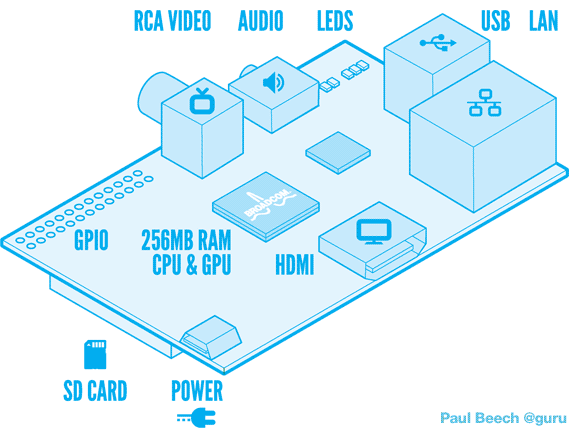
The new Liberty Profile, which is part of WebSphere Application Server V8.5 offering, due for release June 15th 2012, has been designed around developer needs. As a result its a lightweight offering of the full WebSphere App Server that is composable, very fast and reactive to a developers needs. A download and install from scratch for example would take little over 3 minutes. This Liberty Profile still contains the top class containers and services full WAS profiles have used over the years.
To show these two technologies off, I wanted to show both the Liberty Profile running on an extremely small device, as well as the Raspberry Pi running substantial software, including a Debian OS, full JVM and Application Server.
Here's the demo in action:
This is my first pass at running an environment on the Raspberry Pi, so comments and suggestions about what I could try next would be very interesting. I've already got a bunch of ideas i'm planning on trying but would love to hear your thoughts.
In this first pass, I decided to run with the recommended Linux distribution, Debian. The Liberty Profile allows you to use your choice of JVM, from a supported list. However, as this was on an ARM architecture, choices were slightly limited. This time I decided to go for the OpenJDK. Liberty was a straight forward download and unzip from WASdev.net.
Things I noticed straight away:
Where has all my memory gone?!? 256MB has turned into 126MB straight away! Digging a little further shows that an amount of this is taken up by the GPU, and there seem to be workarounds to better allocate the memory for what I want.
Wow, the X Server takes up 30% of my remaining memory! In the future I'll be switching to a more minimal runlevel to make better use of the resources the Pi comes with.
Some of my planned next steps are to play with the J9 JVM on the Pi, upgrade to the released levels of the Liberty Profile and use a more interesting application.
For more information about the Liberty Profile check out the WAS development community at WASdev.net. For more info on the Raspberry Pi, see raspberrypi.org.
Friday, 24 February 2012
Why the Liberty Profile is like the Millenium Falcon!!!
First of all, the Liberty profile can start in under 12 parsecs! (yes, yes, yes, that's a measure of distance, but what Han says goes, OK! Besides, he shot first ;o) )
I was stunned to see this video of the millennium falcon and how it took 3 years to animate, brick by brick. Absolutely amazing job by Francisco Prieto.
Lego Millennium Falcon Stop Motion Assembly 3d from Francisco Prieto on Vimeo.
The chap who worked on the Lego Millennium Falcon build, Francisco Prieto, is clearly an uber determined person, with dedication and attention to detail plainly on show. I've been a privileged developer in my time at IBM, having worked with some equally dedicated, determined and smart folks in the Hursley lab. None more so than the team who have created the Liberty profile for WebSphere, a truly awesome lightweight, componentised developer focused offering that I'm proud to say I'm working on.
The new lightweight OSGi kernel it sits on provides the base for the liberty profile to enable all the words which people like to hear, such as consumable :o) Basically, using OSGi you're able to create your server runtime to be bespoke to your application requirements. If it doesn't use a particular aspect, such as JSPs, why load it into the runtime? This is the componentised aspect similar to the lego build above which allows you to construct your finished server, as you want with componentised building bricks.
So what are we talking about here when we say lightweight and fast? On my macbook pro, here are the stats:
Download size: 26MB (Yep, that's twenty-six Meg!)
Size on disk: 31.2MB
Memory footprint: 70.9MB
Start up time: 1-2 seconds
Total download, install and start time: < 3.5 minutes (that's 210 seconds!)
For proof it only takes 210 seconds to fully install the tools, runtime, create and start a new server, check out this non stop video:
I hope you're impressed with the changes that have been made to the WebSphere offering! Don't forget to check out our new WASdev community (www.wasdev.net) around Liberty, and join in to let us know what you think. You can download the Beta now and have a play. For more info, check out our education pages.
I was stunned to see this video of the millennium falcon and how it took 3 years to animate, brick by brick. Absolutely amazing job by Francisco Prieto.
Lego Millennium Falcon Stop Motion Assembly 3d from Francisco Prieto on Vimeo.
The chap who worked on the Lego Millennium Falcon build, Francisco Prieto, is clearly an uber determined person, with dedication and attention to detail plainly on show. I've been a privileged developer in my time at IBM, having worked with some equally dedicated, determined and smart folks in the Hursley lab. None more so than the team who have created the Liberty profile for WebSphere, a truly awesome lightweight, componentised developer focused offering that I'm proud to say I'm working on.
The new lightweight OSGi kernel it sits on provides the base for the liberty profile to enable all the words which people like to hear, such as consumable :o) Basically, using OSGi you're able to create your server runtime to be bespoke to your application requirements. If it doesn't use a particular aspect, such as JSPs, why load it into the runtime? This is the componentised aspect similar to the lego build above which allows you to construct your finished server, as you want with componentised building bricks.
So what are we talking about here when we say lightweight and fast? On my macbook pro, here are the stats:
Download size: 26MB (Yep, that's twenty-six Meg!)
Size on disk: 31.2MB
Memory footprint: 70.9MB
Start up time: 1-2 seconds
Total download, install and start time: < 3.5 minutes (that's 210 seconds!)
For proof it only takes 210 seconds to fully install the tools, runtime, create and start a new server, check out this non stop video:
I hope you're impressed with the changes that have been made to the WebSphere offering! Don't forget to check out our new WASdev community (www.wasdev.net) around Liberty, and join in to let us know what you think. You can download the Beta now and have a play. For more info, check out our education pages.
Friday, 10 February 2012
Monki Gras drove me to blogging
Yes, it's been a while since my last blog post, I've been very busy creating a new site for developers around the new Liberty Profile, wasdev.net. That's no excuse though! I don't think I've ever blogged about a conference I've not been involved with on this blog site or any others, however, Monki Gras has changed all that...

Monki Gras is the second conference the guys at RedMonk have hosted, after the success of Monktoberfest last year. They're technical conferences (Beer themed!) for developers that really do focus on community, technology and developer relations (and beer!). I haven't seen or been to a conference that compares to the awesomeness of Monki Gras and can't wait to go to the next one!!! I'm really pleased IBM decided to sponsor this conference in it's push for developer relations. Let's take a deeper look into what was on offer.
Sessions
The content for the conference was nothing short of amazing. The caliber of the speakers was excellent, ranging from the technical insights of lanyrd founder @simonw to the OS community experiences of Jenkins creator @kohsukekawa. My personal top three sessions were:
at 3: Why most UX is shite - http://www.slideshare.net/leisa/why-most-ux-is-shite - Leisa Reichel @leisa
Leisa gave a great overview of what needs to be clearly thought out to give users the best out of their potentially brief experience with your site/community/product. It wasn't a typical presentation about details required to make a UI pretty and usable, rather a back to basics trying to get people in the right mindset of what you need to be thinking about to then go on to create a great UI/UX. This is an area which I am quite passionate about learning and changing in my role to help with developer adoption of projects. Great presentation!
at 2: Kitteh vs. Chikin: What Data Can Tell Us About Who We Are and Who We Want to Be. - http://www.slideshare.net/mattlemay/kitteh-vs-chikin-what-data-can-tell-us-about-who-we-are-and-who-we-want-to-be-monktoberfest-2011 - Matt LeMay @mattlemay
A really entertaining presentation with some very interesting social stats contrasting what people share and what people click, including the now infamous kitteh/chikin analogy!

at 1: Creating a developer community - http://www.slideshare.net/kohsuke/building-developer-community - Kohsuke Kawaguchi, @kohsukekawa
Kohsuke gave some great insight about what he learnt in creating the community for Jenkin, including how everyone starts as a visitor and it's the interactions with the community that turns the visitor to a user and a user into a developer. There are of course many pitfalls, including UX which prevent these transitions such as crappy download sites/pages, installation guides and getting started pages that are far too big. A really good session about lowering the barrier to entry for a community.
Lunch
The attention to detail was really good throughout the conference, including great coffee (couldn't find a link - maybe someone could send me their details), great Japanese food, and amazing pastries! This may sound a bit silly, but trust me, it was epic.
Beer!
The link between craft beer and craft software/development was rarely too far away during sessions. As a keen beer drinker :) I certainly appreciated what was on offer, although I didn't stay overnight in London, as I'm on baby alert, so had to stay relatively sober :)
Well done to James Governor for what I understand is the first conference he has organised! Not a bad start, lets see if he can do better next time ;o) Hope to see you there!
Monki Gras is the second conference the guys at RedMonk have hosted, after the success of Monktoberfest last year. They're technical conferences (Beer themed!) for developers that really do focus on community, technology and developer relations (and beer!). I haven't seen or been to a conference that compares to the awesomeness of Monki Gras and can't wait to go to the next one!!! I'm really pleased IBM decided to sponsor this conference in it's push for developer relations. Let's take a deeper look into what was on offer.
Sessions
The content for the conference was nothing short of amazing. The caliber of the speakers was excellent, ranging from the technical insights of lanyrd founder @simonw to the OS community experiences of Jenkins creator @kohsukekawa. My personal top three sessions were:
at 3: Why most UX is shite - http://www.slideshare.net/leisa/why-most-ux-is-shite - Leisa Reichel @leisa
Leisa gave a great overview of what needs to be clearly thought out to give users the best out of their potentially brief experience with your site/community/product. It wasn't a typical presentation about details required to make a UI pretty and usable, rather a back to basics trying to get people in the right mindset of what you need to be thinking about to then go on to create a great UI/UX. This is an area which I am quite passionate about learning and changing in my role to help with developer adoption of projects. Great presentation!
at 2: Kitteh vs. Chikin: What Data Can Tell Us About Who We Are and Who We Want to Be. - http://www.slideshare.net/mattlemay/kitteh-vs-chikin-what-data-can-tell-us-about-who-we-are-and-who-we-want-to-be-monktoberfest-2011 - Matt LeMay @mattlemay
A really entertaining presentation with some very interesting social stats contrasting what people share and what people click, including the now infamous kitteh/chikin analogy!
at 1: Creating a developer community - http://www.slideshare.net/kohsuke/building-developer-community - Kohsuke Kawaguchi, @kohsukekawa
Kohsuke gave some great insight about what he learnt in creating the community for Jenkin, including how everyone starts as a visitor and it's the interactions with the community that turns the visitor to a user and a user into a developer. There are of course many pitfalls, including UX which prevent these transitions such as crappy download sites/pages, installation guides and getting started pages that are far too big. A really good session about lowering the barrier to entry for a community.
Lunch
The attention to detail was really good throughout the conference, including great coffee (couldn't find a link - maybe someone could send me their details), great Japanese food, and amazing pastries! This may sound a bit silly, but trust me, it was epic.
Beer!
The link between craft beer and craft software/development was rarely too far away during sessions. As a keen beer drinker :) I certainly appreciated what was on offer, although I didn't stay overnight in London, as I'm on baby alert, so had to stay relatively sober :)
Well done to James Governor for what I understand is the first conference he has organised! Not a bad start, lets see if he can do better next time ;o) Hope to see you there!
Friday, 7 October 2011
Announcing the WAS V8.5 alpha
The year was 1911. While most were trying to understand how to create accounting machines and punch card readers, one man had a vision. He created a company with the sole intent of constructing a lightweight, fast, consumable application server that was so fast and easy to use, a developer could run it on even the slowest of punch card readers. "The server must start within 5 seconds" he exclaimed! "The server footprint cannot be bigger than 50 megabytes!" he mandated. While some of his more forward-thinking colleagues questioned how a production-ready server with such strong enterprise qualities of services could run in just 50 MB of space, others were puzzled by what an application server was and baffled by this talk of a "megabyte". They called him a dreamer and questioned whether this was even possible. "I want this application server technology to be available, even if it takes a hundred years!" he replied.
The rest is a history that is very much left out of the IBM Centenary literature. However, WebSphere Application Server V8.5 Alpha provides all this and more, using the new Liberty profile. Want to know more? Why not take a look round this new development community, WASdev. You can download the alpha server and tooling. We'd love you to let us know what you think on our forums, and to collaborate with us to help create a next generation development platform that works for you.
The rest is a history that is very much left out of the IBM Centenary literature. However, WebSphere Application Server V8.5 Alpha provides all this and more, using the new Liberty profile. Want to know more? Why not take a look round this new development community, WASdev. You can download the alpha server and tooling. We'd love you to let us know what you think on our forums, and to collaborate with us to help create a next generation development platform that works for you.
Subscribe to:
Posts (Atom)